
Capture Ability
"Capturing Dreams Beyond Barriers: Empowering Photographers of All Abilities!"Glide Gear SNC 100 Snorricam Rig for DSLR (a 3rd-person DSLR vest/camera mount) - Jan 19, 2026
Note: When reading this review, keep in mind that the camera would be facing away from you.
This is a review of the Glide Gear SNC 100 Snorricam Rig for DSLR (also known as the SNC100 Video Camera Snorricam 3rd Person DSLR Vest) from the perspective of someone with no arms or very limited use of their arms. The focus is on real-world usability, accessibility barriers, and whether this rig works for someone with significant upper-body mobility challenges.
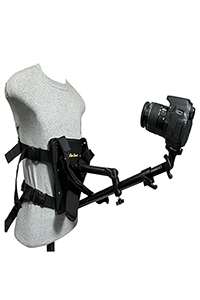
What This Rig Is
The SNC100 is a vest-mounted camera rig that straps onto your torso and holds a camera on a pole extending out from your body. It’s designed to capture immersive, cinematic POV shots and unique “third-person” angles that follow your movement without you holding the camera in your hands.
Key Features
• Supports cameras up to approximately 3 lb (about 1.3 kg).
• 3-foot extension pole with roughly 180° of articulation.
• Adjustable harness for different body sizes.
Review From a Person With No Arms / Very Limited Arm Use
What’s Potentially Good
1. Truly Hands-Free Operation
One of the biggest conceptual advantages is that you don’t need to hold a camera at all — the rig does that for you. For someone with no arms or very limited arm use, this feels like the right kind of idea because the camera is attached to your torso instead of your hands.
If it could be put on and adjusted independently (more on that below), this could theoretically allow you to capture dynamic footage without needing grip strength or dexterity. That represents meaningful accessibility progress compared to handheld or gimbal-based rigs.
Major Accessibility Challenges
2. Putting the Vest On Is Very Hard (If Not Impossible Alone)
The SNC100 relies on traditional straps and buckles to secure around the torso. These straps typically require reaching behind your back, pulling them snug, and tightening them manually. Even people with full upper-body mobility often find this fiddly.
For someone with no arms or extremely limited arm use, this step is a significant barrier unless:
• You have assistive adaptations (e.g., magnetic buckles or Velcro modifications).
• You use a helper or assistant each time you put it on.
• You heavily modify the vest to be one-hand operable or wheelchair accessible.
Without assistance, this rig cannot realistically be donned independently. This limitation alone may rule it out for many users with significant arm impairments.
3. Adjusting the Camera Position Is Also Difficult
Once the vest is on, the camera angle is adjusted using an articulated arm and a ball head. This typically involves squeezing knobs and twisting joints, which assumes some level of arm or hand function.
Without usable hands or arms, you would need:
• Adaptive tools such as large-wing knobs, remote controls, or foot-operated levers.
• Assistance from another person.
While the end result is hands-free footage capture, the setup and ongoing control are not accessible as sold.
4. No Built-In Accessibility Features
Unlike some adaptive photography gear that includes one-handed buckles, joystick controls, or wheelchair-friendly mounting points, this rig uses standard film-industry hardware.
It was not designed with disability access in mind, and that is evident in how the straps and adjustment knobs require manual manipulation.
Practical Concerns in Daily Use
Vest Compatibility With Seating and Wheelchairs
If you use a wheelchair or other mobility device, wearing a chest-mounted vest can introduce additional issues:
• The front arm may interfere with trays, wheelchair armrests, or mobility aids.
• Leaning forward or traveling over uneven terrain may press the camera into obstacles or into your body.
This rig is designed for upright walking movement and dynamic shots, not seated or low-mobility filming situations. This creates a significant design mismatch for many disability users.
Bottom Line (Disability-Focused Verdict)
Best-Case Scenario
If you have assistive support—such as a helper, adaptive modifications, or some usable arm strength—you may be able to achieve the unique point-of-view shots this rig promises.
However, for someone with no arms or severely limited arm use, this product is not accessible out of the box because:
• You cannot put the vest on independently.
• You cannot adjust the camera without manual dexterity.
• It does not adapt well to seated shooting or wheelchair setups.
If You Still Want Snorricam-Style Shots
More access-friendly alternatives to consider include:
• Chest or waist mounts with adaptive buckles (magnetic or Velcro) for independent use.
• Wheelchair-mounted camera arms that clamp to a rigid frame instead of being worn.
• Remote camera control solutions, such as Bluetooth or foot-pedal-operated gimbals.
Can the Glide Gear SNC 100 Snorricam Rig for DSLR (a 3rd-person DSLR vest/camera mount) be adapted for a wheelchair?
Yes, the Glide Gear SNC 100 Snorricam Rig for DSLR can likely be adapted for a wheelchair using additional mounting hardware and creative modification. The vest component is designed for the human body, but the core camera system and its mounting points can be re-purposed.
Adaptation Methods
The SNC 100 features a 3-foot extension pole with a camera mount and twelve 1/4"-20 female mounting threads, along with two 1/4"-20 male mounts for accessories on the frame, providing versatility for custom setups. The main challenge is securely attaching the rig components to the wheelchair frame, which typically involves using specialized clamps and potentially extension arms.
• Clamps and Mounts: Use robust clamps, such as a SmallRig super clamp mount or an ALZO Digital Universal Camera Mount system, to attach the Snorricam's pole or other components to the round or square tubing of a wheelchair. These clamps offer strong grips and can accommodate various frame shapes.
• Extension Arms: The Snorricam's own 3-foot pole provides some reach and articulation, but you might need additional flexible or solid extension arms (like a Manfrotto monopod or ALZO Flex Arm) to achieve the desired height and angle for the "third-person" shot, depending on the specific wheelchair design.
• DIY Solutions: Creative DIY solutions have been documented by other users for mounting cameras on wheelchairs, often involving custom-made straps or modifying items like a wheelchair tabletop to provide a stable base. This approach offers high customization but requires careful planning for stability and safety.
• Camera Operation: Consider how you will operate the camera once mounted. A camera with smartphone control capabilities or a remote trigger can be very helpful for starting/stopping recording and adjusting settings without physically reaching the camera itself.
Given the custom nature of wheelchairs, almost all camera mounting implementations for them require some unique adaptation. Experimentation with different mounting points on the chair (armrests, back supports, frame) will be necessary to find the most stable and effective setup.
These articles offer tips on adapting wheelchair camera mounts using specialized clamps and DIY solutions: